




View count:
939
📌Agoda Guide for Requesting E-Invoice
Agoda 訂房收據與電子發票索取流程指引 Guide for Requesting Agoda Receipt & E-Invoice
若您透過 Agoda 平台預訂住宿,並需辦理本次經費核銷,請參考以下步驟,向 Agoda 索取包含統一編號之官方收據與電子發票。 If you booked your accommodation through the Agoda platform and need to process reimbursement for this expense, please follow the steps below to request an official receipt and electronic invoice from Agoda that includes the Tax ID Number(統一編號).
Step 1
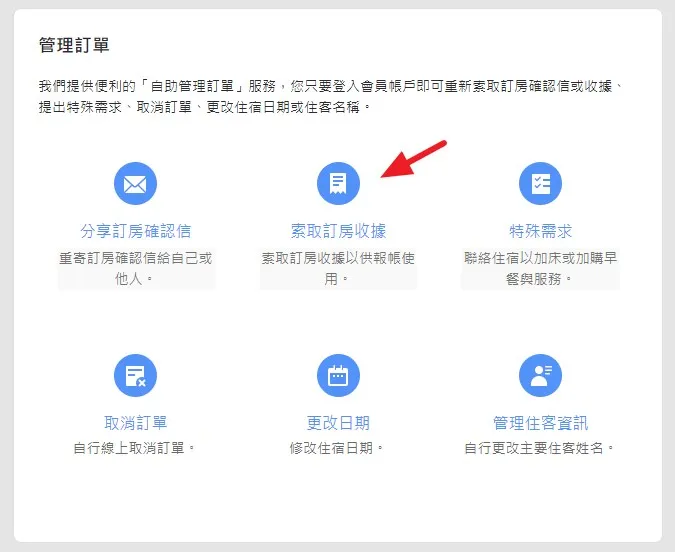
進入訂單管理並點擊索取收據 Go to "Manage Bookings" and click "Get Booking Receipt"
- 登入 Agoda 帳戶,進入「我的預訂/管理訂單」頁面。 Log in to your Agoda account and go to the "My Bookings" page.
- 在訂單管理選單中,點選 「索取訂房收據」 圖示。 Click the "Get booking receipt" icon in the booking management options.
Step 2
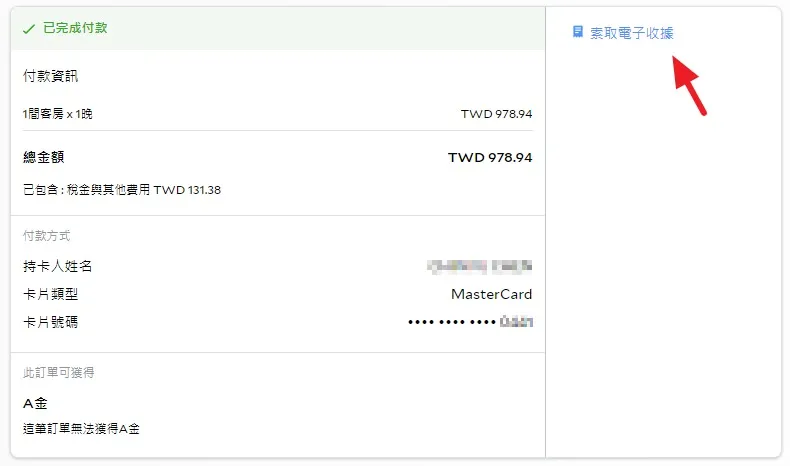
點擊索取電子收據 Click "Get E-Receipt"
- 進入該筆訂單的付款詳細資訊頁面。 Enter the payment details page for the specific booking.
- 在右上角找到並點擊 「索取電子收據」 連結。 Locate and click the "Get e-receipt" link in the upper right corner.
Step 3
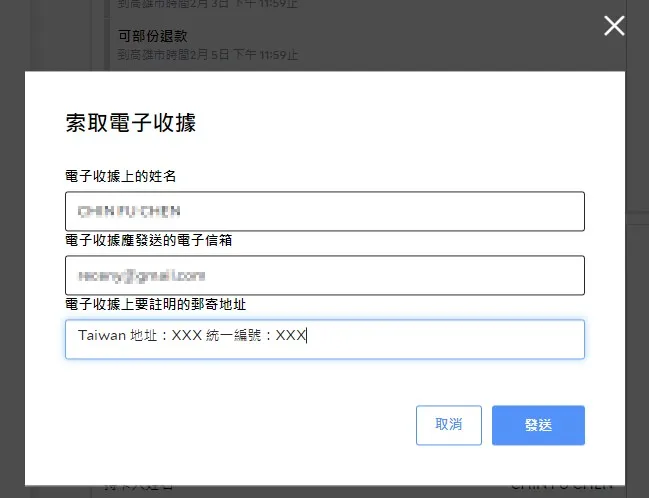
填寫抬頭與統一編號 Fill in Name, Email, and Tax ID
- 系統將跳出「索取電子收據」彈出視窗。 A pop-up window for requesting the e-receipt will appear.
- 填寫 電子收據上的姓名 與接收的 電子信箱。 Enter the Name on the receipt and your Email address.
- 因核銷需要載明統一編號與抬頭,請於「電子收據上要註明的郵寄地址」欄位中,依下列格式輸入: As the Tax ID Number and Title must be included for reimbursement purposes, please enter the following format in the "Mailing Address to be Noted on the E-Receipt" field:: Taiwan 地址/Billing Address:[ 國立臺灣大學 / 03734301 ]
- 確認資料無誤後點擊 「發送」。 Verify the information and click "Send".
Step 4
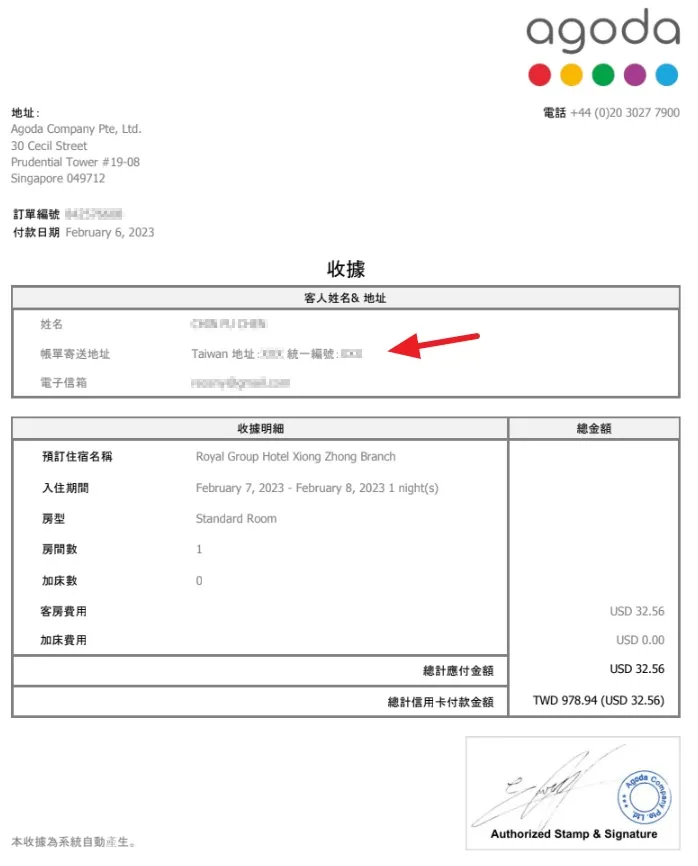
取得 Agoda 官方收據 Obtain the Official Agoda Receipt
- 送出後,系統會自動生成並下載或發送一份包含公司統編與地址的 Agoda 官方收據 (Receipt),可作為報帳憑證之一。 After submission, the system will generate and download/email an Official Agoda Receipt including your address and Tax ID, which serves as a valid proof for reimbursement.
Step 5
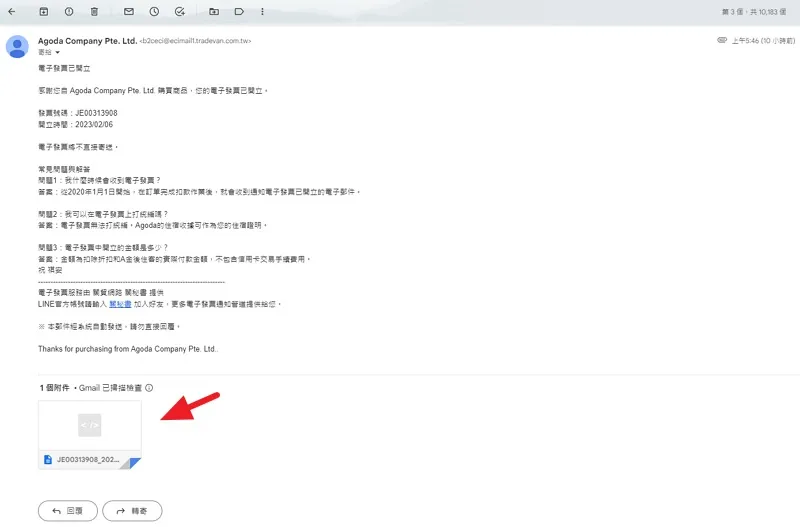
領取境外電商電子發票(開立通知信) Receive the Cross-Border E-Commerce E-Invoice
- Agoda 會透過合作的電子發票系統寄送「電子發票已開立」通知信至您的 Email。 Agoda will send an "E-Invoice Issued" notification email via its e-invoice partner.
- 信件下方會附帶電子發票檔案,請直接下載備份。 An e-invoice file will be attached at the bottom of the email. Please download and save it.
Step 6
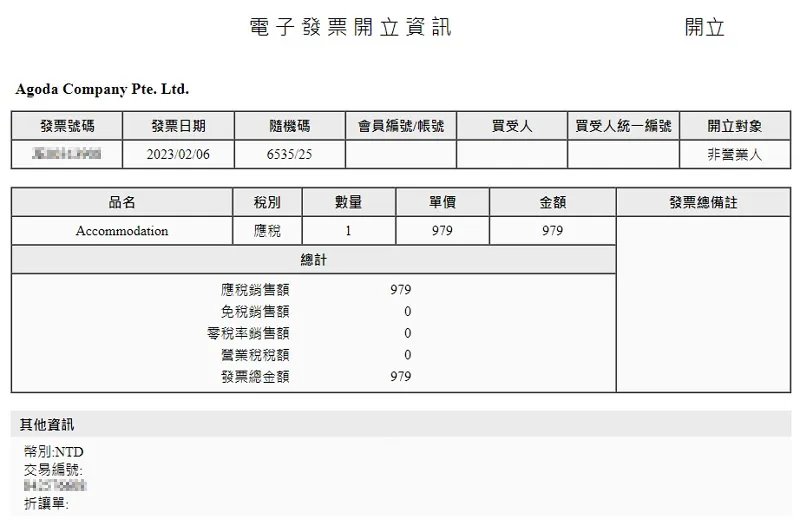
電子發票開立資訊檢視 Review E-Invoice Information
- 下載檔案後開啟,即可確認 電子發票開立資訊(包含發票號碼、發票日期、金額及品名)。 Open the downloaded file to verify the E-Invoice details (including invoice number, date, total amount, and item description).
重要注意事項 / Important Notice
依據 Agoda 說明,Agoda 開立之跨境電子發票無法直接打上統一編號,請務必使用 步驟四 生成的 Agoda 官方收據(內含統編欄位) 作為住宿證明與報帳憑證。 According to Agoda's guidelines, the tax ID number cannot be directly stated on their cross-border e-invoices. Therefore, please be sure to use the official Agoda receipt generated in Step 4 (which includes a tax ID number field) as your proof of accommodation and reimbursement documentation.